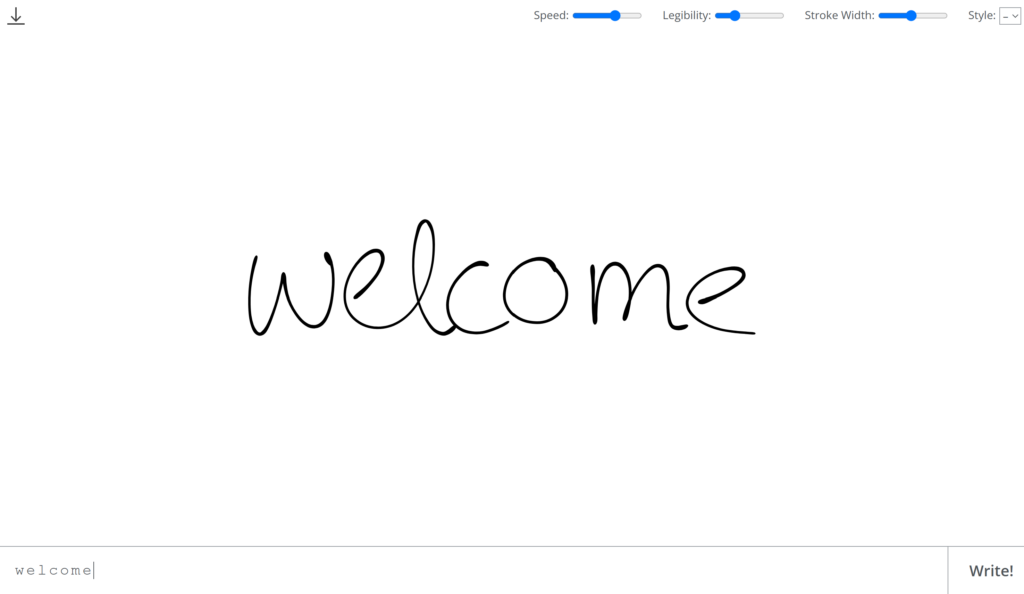
Calligrapher.ai is a web-based tool that utilizes artificial intelligence to generate realistic, computer-generated handwriting. By leveraging a recurrent neural network trained on handwriting samples, it transforms typed text into natural-looking handwritten script.
Key Features:
- Customizable Handwriting Styles: Users can select from various print and cursive styles, adjusting parameters such as speed, legibility, and stroke width to achieve the desired appearance.
- Downloadable Output: The generated handwriting can be downloaded in Scalable Vector Graphics (SVG) format, ensuring high-quality and scalable results suitable for both digital and print media.
- User-Friendly Interface: As a web-based platform, Calligrapher.ai requires no installation, allowing users to access its features from any device with an internet connection.
Use Cases:
- Graphic Design: Designers can incorporate unique, handwritten elements into logos, posters, and other visual content to add a personal touch.
- Personalized Invitations: The tool enables the creation of handwritten digital messages, invitations, or cards for special occasions, enhancing their authenticity.
- Educational Materials: Educators can develop realistic, handwritten teaching materials or worksheets to engage students more effectively.
Pros:
- High Customizability: Offers extensive control over handwriting characteristics, allowing for a wide variety of styles.
- Cross-Platform Accessibility: Being web-based, it is accessible from any device without the need for installations.
- High-Quality Output: The ability to download in SVG format ensures scalability and clarity in various applications.
Cons:
- Limited Handwriting Styles: The platform offers a restricted number of handwriting variations compared to traditional options.
- Internet Dependency: Requires a constant web connection for generating handwriting samples.
- Language Support: Primarily supports English characters and basic symbols, with limited support for other languages.
What makes Calligrapher.ai unique compared to other AI tools?
Calligrapher.ai stands out because it focuses specifically on generating realistic handwriting using AI, rather than standard font-based text generation. Unlike many AI writing tools that focus on text-based automation, Calligrapher.ai mimics human-like strokes, speed, and variations in handwriting, making it ideal for personalizing digital content with an authentic, handwritten touch.
How does Calligrapher.ai enhance the design process?
Calligrapher.ai enhances the design process by providing customizable, AI-generated handwriting that can be tailored to fit different creative projects. Designers can adjust parameters such as stroke width, speed, and legibility to create a unique, handcrafted appearance for branding, invitations, marketing materials, and artistic projects. The ability to download results in high-quality SVG format ensures smooth integration into various design workflows.
What are the main features of Calligrapher.ai?
- AI-Generated Handwriting: Creates natural-looking, handwritten text using neural networks.
- Customizable Styles: Users can modify writing speed, stroke thickness, and legibility to match different handwriting styles.
- SVG File Download: Outputs high-quality, scalable vector files for seamless integration into digital and print designs.
- Web-Based Access: No installation required; accessible from any device with an internet connection.
- Multiple Handwriting Variations: Offers different script and cursive styles to suit various creative needs.
How user-friendly is Calligrapher.ai for beginners?
Calligrapher.ai is highly beginner-friendly, as it has a simple, intuitive interface. Users only need to enter their text, adjust a few sliders to customize the handwriting, and generate their desired output. No advanced technical skills or design experience are required, making it accessible to casual users, designers, and educators alike.
What industries or professions benefit most from using Calligrapher.ai?
- Graphic Design & Branding: Helps create unique, handwritten-style logos, posters, and branding elements.
- Marketing & Advertising: Adds a personal, authentic touch to promotional materials and campaigns.
- Education: Assists teachers in creating handwritten worksheets, notes, and instructional materials.
- Event Planning & Invitations: Enables the design of digital calligraphy for personalized event invitations and greeting cards.
- Authors & Calligraphy Enthusiasts: Provides an easy way to generate beautiful handwriting for book covers, journaling, and personal projects.
Calligrapher AI Affliated or Partner Program
Currently, there is no publicly available information indicating that Calligrapher.ai offers an affiliate or partner program. Their official website does not mention such programs.